

In this post, you are going to learn how to use Monnify API and Laravel HTTP Client to easily integrate into your application.
Monnify is a payment gateway that allows businesses to accept and make payments from customers through web and mobile applications. It offers a variety of payment methods, including: USSD, Mobile banking, Internet banking, Debit cards, Account transfers, and Card payments.
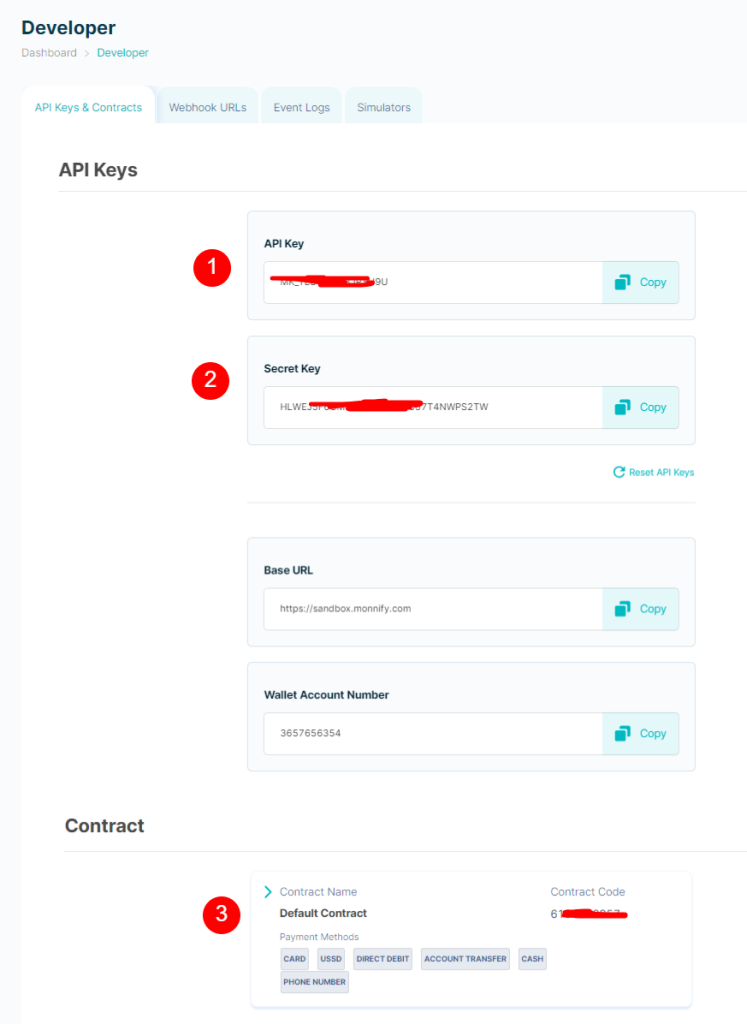
To get started, login to your Monnify account and click on the developer menu to get the following requirements below:
- API Key
- Secret Key
- Contract Code
Step 1: Install Laravel
You need to setup a new Laravel project or open an existing Laravel project that is up-to-date.
You can run this command below on your terminal to create a new project.
composer create-project Laravel/Laravel project-name
Once the project has been created, start Laravel’s local development server using Laravel Artisan’s serve command:
cd project-name

php artisan serve
Step 2: Create a new controller
To quickly generate a new controller, you need to run the make:controller Artisan command.
php artisan make:controller MonnifyController
Update your controller with the code below.
<?php

namespace App\Http\Controllers;

use Exception;
use Illuminate\Http\Request;
use Illuminate\Support\Facades\Http;

class MonnifyController extends Controller
{

    public $products = [];
    protected $accessToken;

    public function __construct()
    {
        $this->generateAccessToken();
        $this->setListOfProducts();
    }

    public function setListOfProducts(){

        $this->products = [
            [
                'id' => 1,
                'name' => 'Bizhub C35 DI Photocopier',
                'description' => 'HP EliteBook x360 1030 G3 13.3" x Touchscreen LCD 2 in 1 Notebook - Intel Core i7 (8th Gen) i7-8650U Quad-core (4 Core) 1.90 GHz - 16 GB LPDDR3-512 GB SSD - Windows 10 Pro 64-bit
                Details
                Brand HP
                Model Name EliteBook
                Screen Size 13.3 Inches
                Color Silver
                CPU Model 8032
                Ram Memory Installed Size 16 GB
                Operating System Windows 10
                Hard Disk Description SSD
                Resolution 1080p... ',
                'price' => 95500.98,
                'image' => 'https://www.copiersdirect.co.uk/wp/wp-content/uploads/Konica-Minolta-Bizhub-C35-Colour-Copier.jpg'
            ],
            [
                'id' => 2,
                'name' => 'Laptop HP EliteBook X360 1030 G2 16GB Intel Core I7 SSD 256GB',
                'description' => 'Laptop HP EliteBook X360 1030 G2 16GB Intel Core I7 SSD 256GB',
                'price' => 450000.45,
                'image' => 'https://swot.ng/wp-content/uploads/2023/12/481.jpg'
            ],
            [
                'id' => 3,
                'name' => 'Hp EliteBook 840 G5 Intel Core I5-16GB RAM/1TB SSD/Backlit Keyboard/FP Reader Wins 11 Pro Laptop +BAG',
                'description' => 'HP ELITEBOOK 840 G5 - INTEL CORE I5 - FINGERPRINT READER- BACKLIT KEYBOARD- FULL HD DISPLAY',
                'price' => 556700.22,
                'image' => 'https://ng.jumia.is/unsafe/fit-in/500x500/filters:fill(white)/product/45/8769362/1.jpg?6129'
            ],

        ];
    }

    public function productList()
    {
        return view('monnify.product_list', ['products' => $this->products]);
    }

    public function generateAccessToken()
    {

        $username = 'MK_********YU9U';
        $password = 'HLWEJ********4NWPS2TW';

        try {

            $response = Http::withBasicAuth($username, $password)
                ->post('https://sandbox.monnify.com/api/v1/auth/login')->collect();

            $this->accessToken = data_get($response, 'responseBody.accessToken');

        } catch (Exception $e) {
            throw new Exception($e->getMessage());
        }
    }

    public function initialize(Request $request)
    {

        $product = collect($this->products)->where('id', $request->product_id)->first();

        try {
            $response = Http::withToken($this->accessToken)
                ->post(
                    'https://sandbox.monnify.com/api/v1/merchant/transactions/init-transaction',
                    [
                        "amount" => $product['price'],
                        "customerName" => "Stephen Ikhane",
                        "customerEmail" => "stephen@ikhane.com",
                        "paymentReference" => $this->generateRandomString(12),
                        "paymentDescription" => $product['name'],
                        "currencyCode" => "NGN",
                        "contractCode" => "6101840957",
                        "redirectUrl" => route('monnify_verify'),
                        "paymentMethods" => ["CARD", "ACCOUNT_TRANSFER"]
                    ]
                )->collect();

            if (
                data_get($response, 'requestSuccessful')
                && data_get($response, 'responseMessage') == 'success'
            ) {
                session()->put('transactionReference', data_get($response, 'responseBody.transactionReference'));
                return redirect()->away(data_get($response, 'responseBody.checkoutUrl'));
            }
        } catch (Exception $e) {
            throw new Exception($e);
        }
    }

    public function verify(Request $request)
    {

        $ref = session()->get('transactionReference');

        try {

            $response = Http::withToken($this->accessToken)
                ->get('https://sandbox.monnify.com/api/v2/transactions/' . $ref)
                ->collect();

                if (
                    data_get($response, 'requestSuccessful')
                    && data_get($response, 'responseMessage') == 'success'
                ) {
                    session()->forget('transactionReference');
                    echo data_get($response, 'responseBody.paymentStatus');
                }

        } catch (Exception $e) {
            throw new Exception($e->getMessage());
        }
    }

    protected function generateRandomString($length = 25)
    {
        $characters = '0123456789abcdefghijklmnopqrstuvwxyzABCDEFGHIJKLMNOPQRSTUVWXYZ';
        $charactersLength = strlen($characters);
        $randomString = '';
        for ($i = 0; $i < $length; $i++) {
            $randomString .= $characters[rand(0, $charactersLength - 1)];
        }
        return $randomString;
    }

}
Step 4: Create a Blade File
<!doctype html>
<html lang="en">
<head>
<meta charset="utf-8">
<meta name="viewport" content="width=device-width, initial-scale=1">
<meta name="description" content="Monnify Payment API Integration">
<meta name="author" content="Chiwetara Igwe">
<title>Monnnify Payment API Integration</title>
<link href="https://cdn.jsdelivr.net/npm/bootstrap@5.3.3/dist/css/bootstrap.min.css" rel="stylesheet"
integrity="sha384-QWTKZyjpPEjISv5WaRU9OFeRpok6YctnYmDr5pNlyT2bRjXh0JMhjY6hW+ALEwIH" crossorigin="anonymous">
</head>
<body>
<svg xmlns="http://www.w3.org/2000/svg" style="display: none;">
<symbol id="check" viewBox="0 0 16 16">
<title>Check</title>
<path
d="M13.854 3.646a.5.5 0 0 1 0 .708l-7 7a.5.5 0 0 1-.708 0l-3.5-3.5a.5.5 0 1 1 .708-.708L6.5 10.293l6.646-6.647a.5.5 0 0 1 .708 0z" />
</symbol>
</svg>
<div class="container py-3">
<header>
<div class="d-flex flex-column flex-md-row align-items-center pb-3 mb-4 border-bottom">
<a href="/" class="d-flex align-items-center text-dark text-decoration-none">
<svg xmlns="http://www.w3.org/2000/svg" width="40" height="32" class="me-2"
viewBox="0 0 118 94" role="img">
<title>Bootstrap</title>
<path fill-rule="evenodd" clip-rule="evenodd"
d="M24.509 0c-6.733 0-11.715 5.893-11.492 12.284.214 6.14-.064 14.092-2.066 20.577C8.943 39.365 5.547 43.485 0 44.014v5.972c5.547.529 8.943 4.649 10.951 11.153 2.002 6.485 2.28 14.437 2.066 20.577C12.794 88.106 17.776 94 24.51 94H93.5c6.733 0 11.714-5.893 11.491-12.284-.214-6.14.064-14.092 2.066-20.577 2.009-6.504 5.396-10.624 10.943-11.153v-5.972c-5.547-.529-8.934-4.649-10.943-11.153-2.002-6.484-2.28-14.437-2.066-20.577C105.214 5.894 100.233 0 93.5 0H24.508zM80 57.863C80 66.663 73.436 72 62.543 72H44a2 2 0 01-2-2V24a2 2 0 012-2h18.437c9.083 0 15.044 4.92 15.044 12.474 0 5.302-4.01 10.049-9.119 10.88v.277C75.317 46.394 80 51.21 80 57.863zM60.521 28.34H49.948v14.934h8.905c6.884 0 10.68-2.772 10.68-7.727 0-4.643-3.264-7.207-9.012-7.207zM49.948 49.2v16.458H60.91c7.167 0 10.964-2.876 10.964-8.281 0-5.406-3.903-8.178-11.425-8.178H49.948z"
fill="currentColor"></path>
</svg>
<span class="fs-4">Product Lists</span>
</a>
<nav class="d-inline-flex mt-2 mt-md-0 ms-md-auto">
<a class="me-3 py-2 text-dark text-decoration-none" href="#">Features</a>
<a class="me-3 py-2 text-dark text-decoration-none" href="#">Enterprise</a>
<a class="me-3 py-2 text-dark text-decoration-none" href="#">Support</a>
<a class="py-2 text-dark text-decoration-none" href="#">Pricing</a>
</nav>
</div>
<div class="pricing-header p-3 pb-md-4 mx-auto text-center">
<h1 class="display-4 fw-normal">Product Lists</h1>
<p class="fs-5 text-muted">List of products available for sales.</p>
</div>
</header>
<div class="container">
<div class="row">
@foreach ($products as $product)
<div class="col-md-4">
<div class="card">
<div class="card-body">
<h5 class="card-title">{{ $product['name'] }}</h5>
<p>Price: {{ number_format($product['price']) }}</p>
<p class="card-text">{{ $product['description'] }}</p>
<form action="{{ route('monnify_initialize') }}" method="post">
@csrf
<input type="hidden" name="product_id" value="{{ $product['id'] }}" >
<button type="submt" class="btn btn-primary">Buy Now</button>
</form>
</div>
</div>
</div>
@endforeach
</div>
</div>
</div>
<footer class="pt-4 my-md-5 pt-md-5 border-top">
<div class="row">
<div class="col-12 col-md">
<img class="mb-2" src="/docs/5.2/assets/brand/bootstrap-logo.svg" alt="" width="24"
height="19">
<small class="d-block mb-3 text-muted">© 2017–2022</small>
</div>
<div class="col-6 col-md">
<h5>Features</h5>
<ul class="list-unstyled text-small">
<li class="mb-1"><a class="link-secondary text-decoration-none" href="#">Cool
stuff</a></li>
<li class="mb-1"><a class="link-secondary text-decoration-none" href="#">Random
feature</a></li>
<li class="mb-1"><a class="link-secondary text-decoration-none" href="#">Team
feature</a></li>
<li class="mb-1"><a class="link-secondary text-decoration-none" href="#">Stuff for
developers</a></li>
<li class="mb-1"><a class="link-secondary text-decoration-none" href="#">Another
one</a></li>
<li class="mb-1"><a class="link-secondary text-decoration-none" href="#">Last
time</a></li>
</ul>
</div>
<div class="col-6 col-md">
<h5>Resources</h5>
<ul class="list-unstyled text-small">
<li class="mb-1"><a class="link-secondary text-decoration-none" href="#">Resource</a>
</li>
<li class="mb-1"><a class="link-secondary text-decoration-none" href="#">Resource
name</a></li>
<li class="mb-1"><a class="link-secondary text-decoration-none" href="#">Another
resource</a></li>
<li class="mb-1"><a class="link-secondary text-decoration-none" href="#">Final
resource</a></li>
</ul>
</div>
<div class="col-6 col-md">
<h5>About</h5>
<ul class="list-unstyled text-small">
<li class="mb-1"><a class="link-secondary text-decoration-none" href="#">Team</a>
</li>
<li class="mb-1"><a class="link-secondary text-decoration-none" href="#">Locations</a>
</li>
<li class="mb-1"><a class="link-secondary text-decoration-none" href="#">Privacy</a>
</li>
<li class="mb-1"><a class="link-secondary text-decoration-none" href="#">Terms</a>
</li>
</ul>
</div>
</div>
</footer>
</div>
</body>
</html>
Step 4: Create Routes
Create the the following below. ensure that you the proper namespace is properly placed on the web.php file.
Route::get('monnify-product-list', [MonnifyController::class, 'productList'])->name('monnify_product_list');
Route::post('monnify-payment-initialize', [MonnifyController::class, 'initialize'])->name('monnify_initialize');
Route::get('monnify-payment-verify', [MonnifyController::class, 'verify'])->name('monnify_verify');
Step 4: Test payment getway
Run the command the below to start the server if it is already started.
php artisan serve
Access the product listing route with this link: http://127.0.0.1/monnify-product-list
